
Automate Client Onboarding for Seamless Efficiency
July 22, 2025

When you automate your client onboarding, the goal is to create a seamless system. It should instantly send out welcome materials, gather all the essential information, and get initial tasks assigned without anyone on your team lifting a finger. This is how you move a client from "deal won" to "project started" efficiently, setting a professional, organized tone from the very first touchpoint.
Why Automating Client Onboarding Gives You a Competitive Edge
Let's be blunt: a clunky, manual onboarding process is a silent growth killer. It’s not just about the hours your team loses to repetitive administrative work-it’s about the crucial first impression you’re making. When the start is slow or inconsistent, you introduce friction and doubt, which can put a brand-new client relationship at risk before it even begins.
Picture this: a new client signs on the dotted line. They're excited to get going, but then... crickets. Days might go by while your team manually creates project folders, fumbles with a generic welcome email template, and struggles to coordinate a kickoff call. That administrative lag doesn't just drain your team's energy; it screams disorganization to your new client.
It's About More Than Just Saving Time
The real magic of automating client onboarding goes far beyond just clawing back a few hours. It's about building a scalable foundation for growth and client retention. A smooth, automated workflow means every single client gets the same high-quality, professional welcome.
This consistency immediately builds trust and validates their decision to choose you. It also frees your team from the mundane copy-paste tasks, letting them focus on what they do best: strategy, building relationships, and delivering outstanding results. This is exactly why automating your core processes is no longer a luxury but a fundamental business strategy. In the same way you might automate content creation to keep your publishing schedule tight, automating onboarding ensures a consistently positive start for every client.
Key Takeaway: The point of onboarding automation isn't to get rid of the human touch. It’s to take care of the repetitive, low-impact tasks so your team can pour their energy into the high-value, strategic work that builds lasting client relationships.
The Business Case for Automation
The move toward automation isn't just a fleeting trend; it's a massive economic driver, especially in industries that rely on scaling their customer base quickly. Just look at the SaaS market-valued at around $317.55 billion by the end of 2024, it's expected to rocket past $1 trillion by 2032. A big reason for that explosive growth is that automated systems make it possible.
Today's business buyers have made their priorities clear: 52% say they prioritize solutions that directly improve operational efficiency. This shows that investing in automation lines up perfectly with what your clients are already looking for.
Ultimately, if you're not automating client onboarding, you're putting your business at a serious disadvantage. You're capping your growth, delivering a subpar customer experience, and burning out your team with administrative work they shouldn't have to do. A well-designed automated system, on the other hand, becomes a powerful engine for client satisfaction, retention, and scalable success.
Get the Full Picture: Map Your Onboarding Process from A to Z

Before you can automate anything, you need to know exactly what you're working with. Seriously, you can't automate a process you don't understand inside and out. So, before you even think about looking at software, the first real step is to create a detailed map of your entire client onboarding journey. This blueprint is your foundation, showing every task, every client interaction, and every potential hiccup along the way.
Think about the very first thing that happens after a client says "yes." Is it an email alert from your e-signature tool when they sign the contract? Maybe it's when you flip a deal to "won" in your CRM. Start there and trace every single step until that client is fully set up and seeing the value you promised.
And don't do this alone in a dark room. Get your whole team involved. Your sales folks, project managers, and customer support team all see the client journey from different angles. Their input is gold for building a map that reflects reality, not just how you think things work.
Documenting Every Single Touchpoint
To build a useful map, you need to get specific-really specific. Vague descriptions won't cut it. For every stage of the onboarding flow, you need to nail down the who, what, and when.
Here are the details you should capture for every step:
- The Task: What actually needs to get done? (e.g., "Send the official welcome email," "Set up a shared client folder in Google Drive," "Book the kickoff call.")
- The Owner: Who's responsible for this? (e.g., The assigned Account Manager, the Project Lead, a Support Specialist.)
- The Trigger: What kicks this task off? (e.g., Contract is signed, first payment clears, client submits the intake form.)
- The Tools: What software is being used? (e.g., Gmail, HubSpot, Asana, Slack.)
- The Time: How long does this task really take? Be honest about the manual effort.
Getting this granular will throw a spotlight on the most time-draining and error-prone parts of your current process. Those are your prime targets for automation. According to a Wyzowl report, 63% of customers say a company's onboarding process influences their buying decision, so getting this right is non-negotiable.
Spotting the Bottlenecks and Celebrating the Wins
As you lay out your process, keep a sharp eye on those "in-between" moments. Where do things grind to a halt? These friction points are usually small, hidden admin tasks, like waiting for someone to manually create a project brief and then share it with the right people.
Pro Tip: Look for any step that involves copying and pasting information from one app to another. These are the low-hanging fruit for automation. You can eliminate tedious data entry, slash the risk of human error, and instantly make your data more reliable.
At the same time, identify the key milestones that make the client feel like they're making progress. This could be when they receive their welcome package, finish their first strategy call, or get a look at the initial project deliverables. These aren't just internal checkboxes; they are crucial moments for reinforcing the client's decision and building excitement.
By mapping out your entire workflow, you create more than just a guide for automation. You build a clear blueprint for a better client experience. It shows you exactly where to plug in automation to handle repetitive work, like generating personalized welcome documents-much like how you might automate content creation for landing pages to maintain quality and speed. This map is your key to building a smoother, more dependable, and far more impressive client experience from day one.
Building Your Smart Onboarding Tech Stack

Now that you have a detailed blueprint of your onboarding process, you can see exactly where the manual bottlenecks are. The next step is all about picking the right tools to do the heavy lifting for you. Building a tech stack isn't about hoarding software; it's about strategically choosing a few powerful platforms that work in harmony to automate your client onboarding.
The goal here is a truly integrated system. A set of siloed tools just creates more work, forcing your team to copy and paste information between platforms. That’s not automation-it’s just a different kind of manual labor.
The Essential Tool Categories
From my experience, a solid onboarding tech stack is built on three core pillars. Each one handles a critical piece of the client journey, moving them smoothly from a signed contract to a successful project kickoff.
Client Relationship Management (CRM): This is your command center for all client data. A CRM like HubSpot or Salesforce should be your single source of truth, holding everything from contact details and deal stages to communication history. This is where the journey begins.
Project Management Software: Once a deal is won, the real work starts. You need a place to manage it all. Tools like Asana, Trello, or Monday.com are perfect for turning your onboarding plan into actionable tasks, assigning them out, and keeping everyone on the same page.
Document and Communication Hubs: Every client comes with a trail of paperwork and conversations. You'll need a central, secure place for things like contracts, intake forms, and day-to-day chat. This is often a mix of Google Drive for files, Slack for quick messages, and a dedicated tool like PandaDoc for e-signatures.
Just having these tools isn't enough. The real magic happens when they communicate with each other automatically.
A Wyzowl study revealed that over 90% of customers believe companies could improve their onboarding process. A clunky, disconnected tech stack is often the reason for that subpar first impression.
The Connective Tissue: Your AI Automation Hub
This is what ties everything together. An automation platform acts as the central nervous system for your tech stack, listening for triggers in one app and setting off a chain reaction of tasks in others. This is how you can truly automate client onboarding and free up your team.
For example, when a salesperson marks a deal as "Won" in your CRM, your automation hub can instantly kick off a sequence:
- A new project is created in Asana from your standard onboarding template.
- A shared client folder is set up in Google Drive with the right permissions.
- A personalized welcome email, complete with a link to your intake form, is sent to the client.
- The internal project team gets a notification in a dedicated Slack channel.
Tools like Zapier are excellent for creating these kinds of simple, one-to-one connections. But for more sophisticated, multi-step workflows, an AI-powered business suite like Stravo AI can serve as a much more powerful hub. It doesn’t just connect apps; it can intelligently process information and draft communications in your brand’s voice, managing the entire onboarding sequence from one place.
To see the difference in action, let's look at how specific tasks change when you move from a manual process to an automated one.
Comparing Manual vs. Automated Onboarding Tasks
| Onboarding Task | Manual Process (The Problem) | Automated Process (The Solution) |
|---|---|---|
| Welcome Email | Team member manually drafts and sends an email after being notified. Prone to delays and inconsistency. | Sent instantly when a deal is marked "Won" in the CRM. Personalized using CRM data. |
| Project Setup | Project manager manually creates a new project, copies over client details, and assigns initial tasks. | A pre-built project template is automatically created in Asana or Trello, complete with tasks and deadlines. |
| File Management | Someone has to create a new client folder in Google Drive, set permissions, and upload initial documents. | A new, properly named folder structure is generated automatically. Key documents are populated. |
| Internal Kickoff | The account manager has to email or message multiple team members to schedule an internal kickoff meeting. | An alert is posted in a dedicated Slack channel, tagging the project team and linking to the new project. |
This table clearly shows how automation eliminates the tedious, error-prone tasks that slow you down and lets your team focus on the high-value work that actually matters to the client.
Evaluating Tools for Your Stack
When you're shopping for software, don't get distracted by a long list of features. To build a system that lasts, you need to focus on what really counts.
- Integration Capability: This is non-negotiable. Does the tool have a public API or robust native integrations with your other core platforms? If it can't talk to your other tools, it's an island.
- Scalability: Think about where your business will be in a year or two. Will this tool grow with you? Look at its pricing tiers, user limits, and ability to handle more clients and complexity.
- True Value: The price tag is only part of the story. The real value comes from the hours it saves, the costly mistakes it prevents, and the professional impression it helps you make.
By carefully choosing tools that check these boxes, you aren't just buying software. You're building an intelligent engine that delivers a smooth, impressive, and efficient onboarding experience every single time.
Alright, you’ve done the prep work. You've mapped out your process and picked your tools. Now for the fun part: connecting the dots and building your very first automated workflow. This is where theory meets reality, and where you'll start to see a real impact.
Let's walk through a common scenario for a service-based business to show you how to set up the triggers and actions that make automate client onboarding a reality.
Picture this: a new client just signed your proposal. Instead of a mad dash of manual emails, project setups, and team notifications, a single click in your CRM kicks off the entire sequence. This isn't some far-off fantasy; it's completely achievable with the right setup. The goal is to build a system that handles the administrative grunt work instantly, freeing up your team to focus on building that crucial client relationship from day one.
This is a simplified, high-level look at how these moving parts connect.
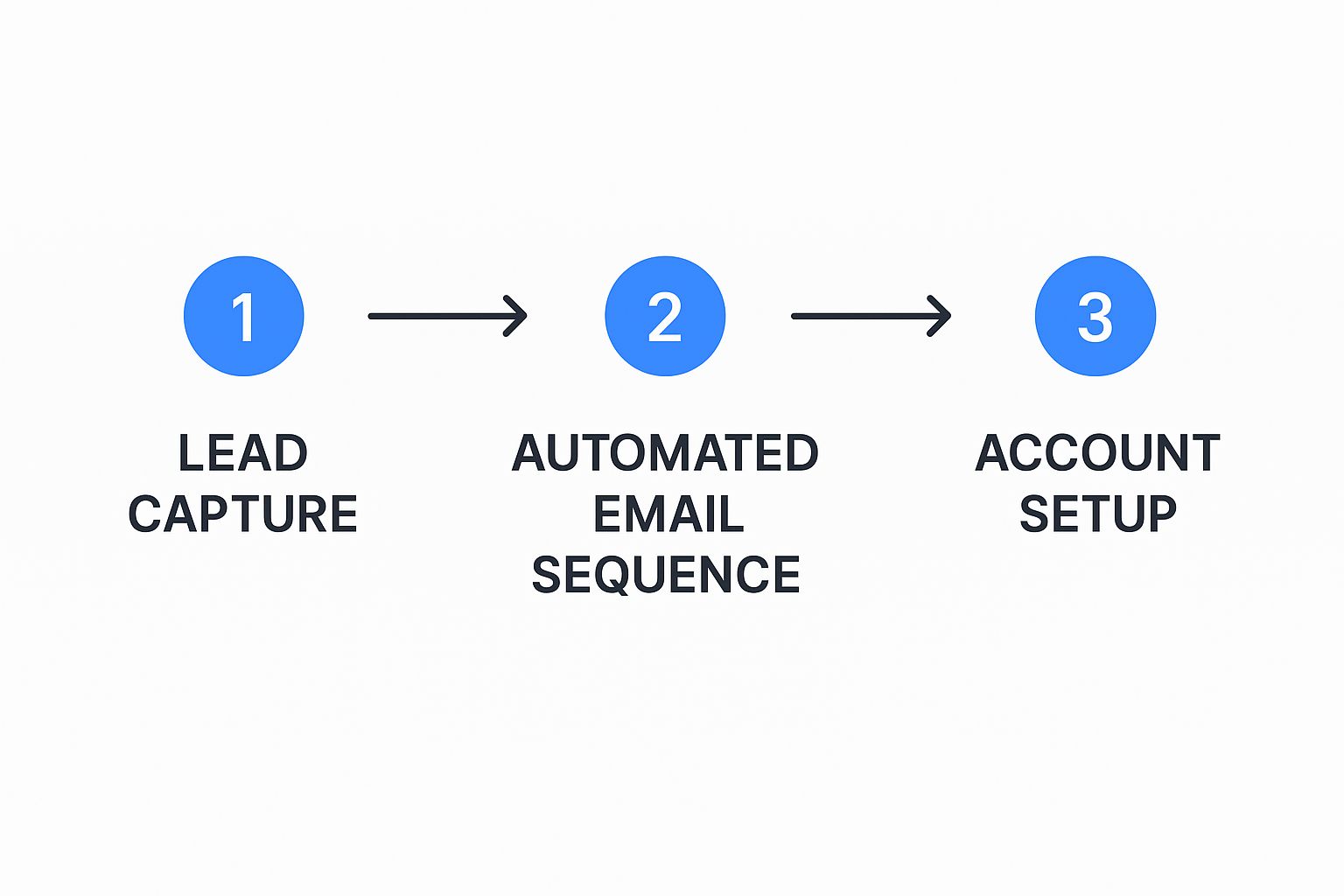
As you can see, the idea is to flow seamlessly from capturing a new client to automatically nurturing them and getting their project set up, all without anyone needing to lift a finger.
Defining Your Initial Trigger
Every single automated workflow begins with a trigger. Think of it as the starting pistol-the "if this happens" event that sets everything else in motion.
For client onboarding, the most reliable and effective trigger is usually a status change inside your CRM. When someone on your sales team moves a deal in a platform like HubSpot or Salesforce from "Proposal Sent" to "Deal Won," that’s your signal. This one action is the clearest indication that a prospect has officially become a client.
Here's a peek at what a workflow builder, like the one inside Stravo AI, looks like when you're setting up these kinds of automations.
Mapping Out the Action Sequence
With your trigger set, it’s time to build out the "then do this" part of your workflow. This sequence of automated actions is where you'll claw back a ton of time.
Let’s continue with our "Deal Won" trigger and build the chain of events:
- Create the Project: The automation hub talks to your project management tool (like Asana or Trello) and instantly creates a new project using a pre-built onboarding template. Just like that, all your standard kickoff tasks are generated and assigned.
- Send a Welcome Email: A personalized welcome email is immediately sent to the client's main point of contact. By pulling data from your CRM, it can greet them by name and even reference the specific service package they purchased. This email is the perfect place to include a link to an online intake form to gather any remaining details.
- Generate a Client Folder: A new, neatly organized client folder is created in Google Drive or SharePoint. The system names it consistently (e.g., "Client Name - Project Start Date") and automatically shares it with the right internal team members. No more messy, inconsistent folder structures.
- Notify the Team: A message is automatically posted in a dedicated Slack or Microsoft Teams channel, giving the project team a heads-up that a new client is officially on board. This message can include key details and a direct link to the new project in Asana.
This automated chain reaction ensures nothing ever falls through the cracks. It completely replaces manual checklists and shrinks the potential for human error to almost zero. It’s a huge opportunity, especially when you consider a 2025 industry analysis found that while 93% of organizations see automation as critical, only 25% have actually automated their onboarding from start to finish.
Pro-Tip: Get even smarter with your workflow by using conditional logic. For example, you could set up a rule: if a client signs up for a "Premium" service package, the system automatically adds an extra action to schedule a personal welcome call with a senior account manager.
By orchestrating these steps, you're not just being efficient; you're building a repeatable, scalable process that delivers a polished and professional experience from the second a client says "yes." Automating these kinds of repetitive tasks is a game-changer, and if you're interested in applying this elsewhere, check out our guide on how to automate content creation without losing quality.
Adding AI and Personalization to Your Workflow

Once you’ve got the basic mechanics of your automation humming along, it’s time to make your onboarding process not just faster, but smarter. We're moving beyond simple trigger-and-action rules. The real magic happens when you layer in artificial intelligence to add a level of personalization and insight that just wasn't possible before. This is how you automate client onboarding in a way that feels both incredibly efficient and surprisingly personal.
Imagine an AI that doesn't just copy-paste data from an intake form. Instead, it intelligently processes the documents, extracts key information, and uses it to automatically populate a project brief. It’s about understanding context. For instance, an AI could analyze initial email exchanges to gauge a new client's sentiment, flagging a potentially nervous account for a personal check-in from your team. This allows you to get ahead of issues before they even surface.
This kind of smart automation is already making waves in complex fields like accounting and finance. AI is now handling tedious but critical tasks like Anti-Money Laundering (AML) checks, Know Your Customer (KYC) compliance, document verification, and even drafting engagement letters. In fact, some experts are predicting that by 2025, a staggering 95% of customer interactions will involve AI in some capacity.
Marrying High-Tech with High-Touch
The biggest fear I hear about automation is that it will make the client experience feel cold and robotic. That’s a valid concern, but the key is to strike the right balance. You use technology to handle the repetitive, behind-the-scenes work, freeing up your team to focus on strengthening the human connection.
A smart system doesn't replace your people; it empowers them. Think about where your team can deliver the most value:
- Strategic Check-ins: Instead of a generic "just checking in" email, your automation can schedule a personal call for an account manager right after the AI flags that a client has completed a key step, like submitting all their initial documents.
- Personalized Video Messages: A workflow could trigger a task for your team lead to record a short, personal video welcoming the new client by name and referencing their specific goals from the intake form.
- Proactive Support: If an AI model detects confusion-maybe a client is asking the same question in different ways over email-it can create a priority ticket for a support specialist to reach out directly and offer help.
Key Insight: Real personalization isn't just sticking a
{first_name}tag in an email. It’s about anticipating a client's needs and delivering the perfect human touchpoint at the exact right moment, all powered by the efficiency of your automated system.
Building Intelligence into Your System
Getting this level of smart automation is more accessible than you might think. Platforms like Stravo AI are designed to be more than just a connector between apps; they act as an intelligent hub for your operations.
For example, instead of just firing off a standard welcome email, an AI writing assistant can draft a unique message in your company's distinct voice, tailored to the client’s industry and the specific services they bought. This ability to inject intelligence is critical, not just for onboarding but for all your business communications. You can dig deeper into why AI is key to automating content creation and apply the same thinking here.
Ultimately, you’re aiming for a self-improving system where automation handles the predictable, and your team handles the personal. It's a powerful combination that boosts efficiency while building stronger, more loyal client relationships from the very first day.
Your Questions About Onboarding Automation Answered
https://www.youtube.com/embed/ZQPXJG4P1mY
Even with a solid plan, jumping into automation can feel a little daunting. It's completely normal to have a few questions or reservations. In fact, it’s smart to think through these things before you start building, ensuring the system you create actually serves you and your clients.
Let's walk through some of the most common concerns I hear from agency owners.
Will Automation Feel Impersonal to My Clients?
This is probably the biggest fear, but it’s based on a misunderstanding of what good automation does. A well-designed system actually makes your service more personal, not less.
The goal isn't to replace your team. It’s to automate client onboarding to handle the tedious, administrative grunt work. This frees up your team to focus on what they do best: building relationships, providing strategic advice, and delivering a fantastic client experience.
Think about it. Automation handles the boring stuff-sending follow-ups, collecting files, and checking off tasks. This means your team has more time for meaningful, personal check-ins. It's all about augmenting your team’s ability to connect, not replacing them.
What Is the Most Important First Step to Automate?
If you want the biggest bang for your buck right away, automate the initial welcome and information-gathering process. This is everything that kicks off the moment a client signs the contract.
The most impactful first step is typically automating the initial 'welcome and data collection' sequence. It sets a professional tone, eliminates manual data entry, and prevents the dreaded 'post-sale silence' that creates anxiety for new clients.
Getting this right ensures every new client receives an immediate, warm welcome and a clear path to provide you with everything you need. It starts the relationship off on the right foot and shows you’re organized from day one.
What If I Need to Automate More Than Just Onboarding?
That's the beauty of it! Once you get the hang of automating your onboarding, you start seeing opportunities everywhere. The same principles you apply to new clients can be used for dozens of other repetitive processes in your agency.
Many agencies find that after tackling onboarding, the next logical step is figuring out how to automate content creation. This can be a massive time-saver, freeing up even more of your team's creative and strategic energy.
Ready to build smarter workflows and get time back? Stravo AI provides all the tools you need to automate onboarding, content creation, and more, all from one intelligent platform. Get started with your free trial today.
Write smarter, starting today
Join entrepreneurs and teams who draft, rewrite and ship their content with one AI suite.