

Taking a piece of content you’ve already created—say, a killer blog post—and reshaping it into a new format is what we call content repurposing. Think of it as turning that one article into a dynamic video, a shareable infographic, or a snappy social media thread.
It’s a smart way to get your message in front of new people and drive your point home without having to start from zero every single time. Suddenly, one great piece of content can fuel an entire marketing campaign.
Why Content Repurposing Is a Smart Marketing Play
Before we get into the nuts and bolts of how to do this, it’s really important to understand why it works so well. Content repurposing is much more than just a clever time-saving trick. It’s a powerful method for amplifying your marketing and squeezing every last drop of value out of your best work.
Instead of feeling like you’re stuck on a never-ending content creation treadmill, you can strategically reuse the assets you already know perform well. This is how a single, deeply researched blog post can become the foundation for a whole month's worth of marketing activities.
Multiply Your Reach and Connect with New Audiences
Let’s face it: not everyone likes to consume content in the same way. Some of your audience members might love nothing more than getting lost in a detailed, long-form article. Others? They’d much rather watch a quick video on their phone during their morning commute or scan a colorful infographic.
If you only stick to one format, you're unintentionally leaving huge parts of your potential audience out in the cold. But when you repurpose that blog post into a podcast episode, you suddenly grab the attention of people who prefer listening. Turn that same post into a series of Instagram Stories, and you'll connect with a completely different, visually-focused crowd.
Repurposing isn't about repeating yourself. It's about translating your core message into different languages spoken by different platforms and audiences, ensuring your best ideas resonate as widely as possible.
Spreading your content across multiple platforms also gives your SEO a nice boost. Every new asset you create—a YouTube video, an infographic on Pinterest, an article on LinkedIn—is another chance to show up in search results and bring more traffic back to your website. It helps you build what's known as topical authority, showing search engines that you’re the expert on a particular subject.
Maximize Your Marketing ROI
Let's be real—creating great content takes a lot of time, effort, and often, money. The business case for repurposing is incredibly strong. As the time investment for original content keeps climbing, you have to find smarter ways to maximize your return. The data backs this up, showing that businesses that make blogging a priority are 13 times more likely to see a positive ROI.
Repurposing breathes new life into that initial investment, extending its impact for months or even years. For example, that one big video shoot you paid for can be sliced and diced into dozens of individual assets:
- The full-length video for your YouTube channel
- Short, punchy clips for TikTok and Instagram Reels
- The audio stripped out for a podcast episode
- Powerful quotes turned into graphics for X (formerly Twitter)
- A full transcript that becomes a brand-new blog post
To give you a clearer picture of why this strategy is so effective, here’s a quick breakdown of its core advantages.
Core Benefits of a Content Repurposing Strategy
| Benefit | Strategic Impact |
|---|---|
| Increased Reach | Connects with diverse audience segments across multiple platforms. |
| SEO Improvement | Creates more indexed assets, boosting topical authority and search visibility. |
| Time and Cost Efficiency | Reduces the need to create new content from scratch, lowering production costs. |
| Message Reinforcement | Presents the same core message in various formats, improving audience recall. |
| Content Longevity | Extends the useful life of your best-performing content, making it evergreen. |
As you can see, the benefits go far beyond just saving a bit of time. It's a comprehensive approach to making your content work harder for you.
This whole process gets even faster when you bring AI tools into the mix. Our guide on AI content creation for beginners walks you through how these tools can help you scale up your production without sacrificing quality. Ultimately, repurposing turns one-off expenses into hardworking, evergreen assets that keep delivering value long after you hit "publish."
Finding Your Most Valuable Content to Repurpose
If you want to get the most mileage out of your content repurposing, you can't just throw a dart at your blog archive. The real secret is to start with a piece that’s already a proven winner. Let’s be honest, not every piece of content is a home run, so the first real step is to audit what you’ve already got and find those hidden gems.
Think of it like a treasure hunt through your own work. You're looking for the articles, guides, or videos that already have some momentum—the ones that have clearly struck a chord with your audience. This data-first approach means you’re betting on a sure thing instead of wasting time trying to breathe life into something that fell flat from the start.
Dig into Your Analytics
Your website's analytics are your best friend here. Pop open your Google Analytics dashboard (or whatever platform you use) and look for the pages that are pulling in high traffic, keeping people around for a while, and have a low bounce rate. These metrics don't lie; they tell you exactly what your audience finds interesting.
- High Traffic: These are your rockstar posts. They already have an audience, so you know people are searching for and finding this topic.
- Long Average Engagement Time: If someone is spending 5-10 minutes on a page, you’ve hit gold. That topic is meaty enough to be expanded into a webinar, a detailed video, or even a mini-course.
- Strong Keyword Performance: Don't forget Google Search Console. See which articles are ranking for your money keywords. Repurposing these can build incredible topical authority and give your SEO a serious boost.
For example, a quick look at a Google Analytics report showing top pages by user engagement can tell you exactly where to start.

This kind of report instantly shows which pages are holding people's attention, making them perfect candidates to be reimagined in a different format.
And don't just stop at your website. Check your social media analytics, too. Did a LinkedIn post get an unusual number of shares and thoughtful comments? That’s a clear signal the topic has legs and could make a fantastic infographic or a series of short-form videos.
Look for Evergreen Appeal
From my experience, the absolute best content to repurpose is evergreen. This is the stuff that isn't tied to a specific date or fleeting trend; it stays relevant and useful for months, sometimes even years. We're talking about foundational "how-to" guides, deep-dive explainers, and comprehensive case studies.
An article that performs well year-round is a content annuity. It continuously provides value to your audience and can be reshaped into new formats to attract different segments over time.
A blog post about a marketing trend from 2021 is probably collecting dust. But a guide on "how to build a marketing strategy"? That’s timeless. Focusing on these evergreen assets will give you the best possible long-term return on your repurposing efforts. If you need some inspiration for creating these core pieces, check out our guide on the best AI content generator tools for high-quality blog posts.
Finally, just listen. Pay attention to what your customers and sales team are saying. Are there specific blog posts that prospects mention on sales calls? Do certain guides consistently generate qualified leads? This kind of qualitative feedback is just as valuable as the hard data, pointing you directly to the content that solves real-world problems for your audience.
How to Pick the Right New Format for Your Old Content
You’ve found your greatest hits—the content that really resonates. Now for the fun part: what do you turn them into next? This isn’t about a simple copy-and-paste job. Real success with repurposing comes from playing matchmaker between your original content and the best possible new format.
It’s about understanding the environment. People act differently and expect different things on different platforms. A super-detailed research report is dead on arrival as a TikTok video, but its key stats? Those are pure gold for a slick, shareable infographic. A heartfelt customer story buried deep in a blog post could be a much more powerful video testimonial. You're just reframing the message for a new audience.
The question I always ask myself is this: "How can I share this same value in a way that feels totally natural and fresh on a different channel?" Think of the format as the vehicle; you need to pick the right one for the road ahead.
Turning Words Into Pictures
One of the quickest wins in content repurposing is turning your text-based pieces into visual ones. We’re wired to process images way faster than text, which makes things like infographics, charts, and quick videos absolute lifesavers for grabbing attention on noisy social feeds.
Let’s say you have a long, comprehensive "how-to" guide. It’s valuable, sure, but that scrollbar can look pretty daunting. Here’s how I’d break that down:
- Infographics: I’d pull out the absolute must-know stats, steps, or takeaways and get them designed into an eye-catching infographic. These are fantastic for Pinterest and LinkedIn, where visual data gets a ton of love and shares.
- Checklists: The steps from the guide can easily be turned into a simple, downloadable PDF checklist. This is a great way to offer immediate value and it works wonders as a lead magnet.
- Quote Graphics: I’d find the punchiest sentences or expert quotes in the article and create branded graphics for Instagram or X (formerly Twitter). They’re bite-sized, shareable, and get your point across fast.
This graphic below gives you a good sense of how different formats compare when you weigh the effort against the potential payoff.
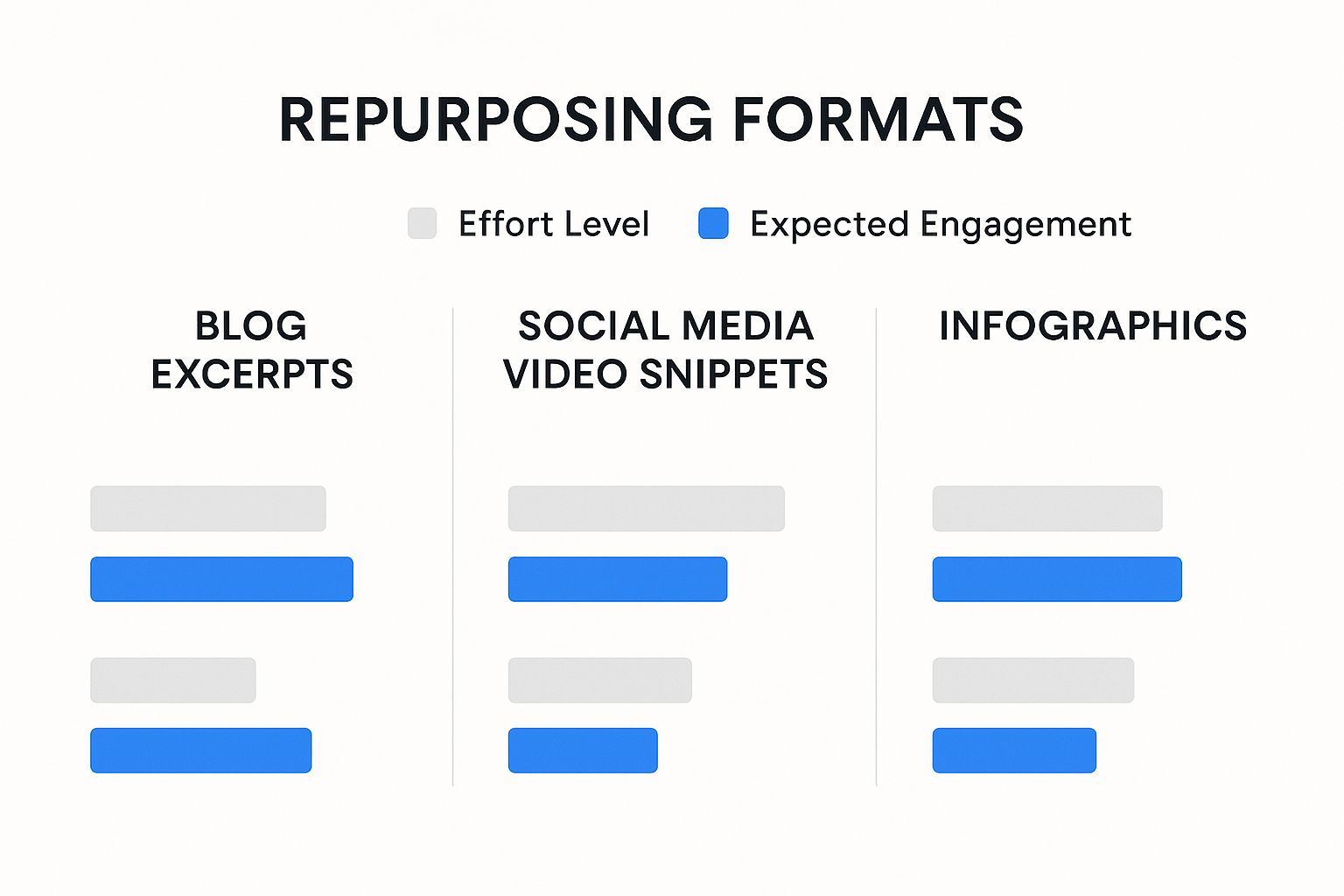
As you can see, making high-quality video snippets takes more work, but the engagement is often worth it. It’s an investment that makes sense for your absolute best content.
Content Repurposing Format Matchmaker
Deciding on the perfect new format can feel overwhelming. This table is designed to help you quickly match your existing content to a new format based on what you're trying to achieve.
| Original Content Type | Ideal Repurposed Format | Primary Goal |
|---|---|---|
| Long-Form Blog Post | Infographic or Video Series | Social Sharing & Engagement |
| Webinar/Podcast | Short Video Clips or Quote Graphics | Quick Wins on Social Media |
| Data-Heavy Report | Interactive Chart or Key Stat Graphics | Authority Building & Press |
| Customer Case Study | Video Testimonial or Podcast Interview | Building Trust & Social Proof |
| "How-To" Guide | Downloadable Checklist or Email Course | Lead Generation |
Think of this as your starting point. The key is to look at what you have and ask what format will give it a second life with a new audience.
Moving Into Audio and Video
Don't sleep on the power of audio and video. These formats build a much more personal connection because people can hear your voice and see your face—it lets your brand’s personality really come through. A single webinar or a beefy blog post can be a goldmine here.
For instance, that popular blog post you have outlining a five-step process? That’s a ready-made five-part video series for YouTube or even TikTok. Each video could cover one step, which not only breathes new life into the content but also gets people to follow you for the next part. And this doesn't have to be a huge production—our guide on how to create SEO content with AI in under 10 minutes shows how modern tools can speed this up.
Audio is another fantastic avenue. A couple of ideas:
- Make it a podcast episode: Just read your blog post out loud. I like to add in a few extra personal stories or off-the-cuff comments to make it feel more conversational.
- Create audiograms: Pull the best 30-60 second soundbites from a webinar or podcast recording and turn them into those cool audiogram videos for social media.
When you thoughtfully pick the right format, you’re not just recycling content. You’re strategically unlocking its true potential to work for you everywhere your audience spends their time.
Putting Your Repurposing Plan Into Action
Alright, you've pinpointed your strongest content and have a new format in mind. Now for the fun part: actually making it happen. This is where you roll up your sleeves and shift from planning to creating.
The biggest mental hurdle to clear is seeing each repurposed piece as a brand-new creation, not just a copy-and-paste job. You're not just recycling; you're reimagining. It turns out this is a core tactic for most marketers. Surveys show that a staggering 94% of marketing pros repurpose content, whether it's a simple reformat or a complete transformation for a new platform. It’s a foundational skill for squeezing every drop of value from your hard work.
Turning Text Into Eye-Catching Visuals
One of the quickest wins in repurposing is converting dense, text-heavy content into something visual and shareable. Let’s say you have a deep-dive research report packed with great data. It's a goldmine, but let's be honest, only a fraction of your audience will read the whole thing.
To get those insights in front of more eyes, you can extract the most compelling stats and build a sharp infographic. And no, you don't need a design degree to do it.
Here’s how I’d tackle it:
- Find the "Wow" moments: Scan your report and pull out 3-5 of the most surprising or impactful statistics. What numbers make you go, "Huh, that's interesting"?
- Tell a story: What's the narrative these numbers are telling? Is it about a growing problem, a game-changing solution, or an emerging trend? Use that as the core theme for your visual.
- Lean on templates: Fire up a tool like Canva. They have a massive library of infographic templates that give you a professional starting point. You just plug in your data, tweak the colors and fonts to match your brand, and you're good to go.
This approach lets you create something that looks polished and is incredibly easy for your audience to digest and share.
Converting an Article Into a Video Script
Another fantastic move is turning a successful blog post into a quick, engaging video. Video creates a completely different kind of connection—it’s more personal and can grab attention in a way text just can’t. The trick is not to simply read your article out loud. You need to distill its core message into a natural, conversational script.
Your best blog posts are essentially ready-made scripts waiting to happen. The main headings can become your talking points, and the core arguments form the narrative arc of your video.
Start by outlining the video, using your article's main subheadings as the backbone. Under each point, jot down a few simple sentences as if you were explaining the concept to a friend over coffee. Keep it brief. For YouTube, a 2-3 minute video is a great target, and for social media clips, you'll want to go even shorter.
If you're looking to speed things up, this is a perfect place to start experimenting with how to automate your content creation. AI tools can take your article and generate a solid first draft of a script, handling the initial heavy lifting of outlining and saving you a ton of time.
Using AI to Accelerate Your Repurposing Workflow
https://www.youtube.com/embed/WBG0Ggmhu2M
Let's be honest, manually turning one piece of content into ten different formats is a grind. For anyone on a small team or trying to reach a global audience, it can feel like a mountain of work. You pour your energy into a great blog post, only to realize you now have to start all over again to create a video script, a social media thread, and a newsletter blurb.
This is exactly where AI can step in—not to take over your job, but to act as an incredibly efficient assistant. Modern AI tools are built to do the heavy lifting of content adaptation, freeing you up to focus on the strategy and creativity that actually matter.
Think of AI as the ultimate content production intern. It can scan a 2,000-word article and instantly spit out a sharp summary for your email list, pinpoint key stats for social media graphics, or even draft a series of poll questions based on your main arguments.
Jumpstart Your Creative Process with AI
One of the biggest hurdles in repurposing is just getting started. That "blank page" feeling is real, especially when you're trying to figure out how to reframe a dense webinar for a snappy LinkedIn post.
Instead of staring at a blinking cursor, you can feed a transcript into an AI and ask it for five different angles, all written in your brand's voice. Suddenly, you have multiple starting points. For example, I’ve often taken a detailed case study, given it to an AI, and asked for a first-draft video script. The tool structures the story, pulls out the most compelling moments, and even suggests visuals. My job then becomes refining it and adding that crucial human touch.
AI's real magic is getting you 80% of the way there in a fraction of the time. Your expertise is what delivers the final 20%—the nuance, personality, and strategic polish that makes the content truly connect.
This kind of speed is a massive advantage when you're adapting content for different regions. Traditional localization is notoriously slow and expensive. I’ve seen projects where adapting a single whitepaper for five markets takes over 40 hours of manual work. With an AI-first approach, you can get drafts that are 80-90% complete, which cuts down the time and cost immensely. For a deeper look, Typeface.ai has a great article on building a global content strategy with AI.
Practical AI Repurposing Tactics
So, what does this look like day-to-day? Here are a few practical ways I’ve seen teams put AI to work in their repurposing efforts:
- Spin Up Social Snippets: Upload a blog post and prompt your AI tool to generate a ten-post X (formerly Twitter) thread, complete with smart hashtags.
- Segment Your Messaging: Give the AI one article and ask it to write two separate email drafts: one for new leads emphasizing the problem you solve, and another for loyal customers highlighting advanced features.
- Outline Video Scripts: Feed a podcast transcript into an AI and ask it to create a script for a short YouTube video that covers the main takeaways in an engaging way.
These workflows are a huge help, especially for startups and smaller teams trying to punch above their weight. If you're wondering how this applies to new businesses, we have a whole guide on how AI tools can boost content marketing for startups. By letting AI handle the initial grunt work, your team can finally scale its content output without having to scale its headcount.
Common Questions About Content Repurposing

Whenever I talk to marketers about content repurposing, a few of the same "what ifs" always pop up. It's natural to have questions when you're starting out. Getting these cleared up from the get-go is the difference between a hesitant start and a confident, effective strategy.
Let's walk through some of the most common hurdles I see people wrestling with.
Will Google Penalize Me for Duplicate Content?
This is easily the biggest fear that holds people back. The good news? The short answer is no, as long as you're smart about it.
Google's penalties are designed to stop spammy behavior, like copying a page word-for-word across multiple domains to try and game the system for the same keywords. That's not what we're doing here.
Repurposing is about transformation, not just duplication. When you turn a blog post into a YouTube video, a podcast, or a sharp-looking infographic, you're creating a fundamentally different piece of content. These new assets don't directly compete with your original article in the search results because they exist in different ecosystems.
Now, what if you do want to republish a blog post on a platform like Medium or LinkedIn? The fix is simple: use a canonical tag (
rel="canonical"). This little piece of code points back to the original article on your site, telling search engines, "This is the source of truth." It completely sidesteps any duplicate content concerns.
Once that fear is out of the way, the next question is usually about the creative process itself.
How Much Should I Change the Original Content?
Honestly, there's no magic number here. How much you change a piece of content depends entirely on the new format you're aiming for and your goals for that format. Think of it as a spectrum.
- Light Touch: If you're just sharing an existing article on social media, you might only need to write a fresh, punchy introduction and a platform-specific call-to-action.
- Significant Reformatting: Turning a data-heavy report into an infographic requires a major overhaul. You're pulling out the most critical data points and re-imagining them visually. It’s a completely different way of telling the story.
- Total Transformation: Creating a webinar from a white paper involves the most work. You'll need to expand on the core concepts, add new stories or examples, create slides, and build in interactive elements like polls and Q&As.
The golden rule is this: adapt the content to the new environment. Your repurposed piece should feel native to the platform where it lives, not like a clumsy copy-and-paste job.
How Do I Measure the Success of Repurposed Content?
You can't use the same yardstick for every piece of content. Success looks different for a video than it does for a PDF guide.
For a YouTube video, you’ll be watching metrics like view duration, watch time, and click-through rates. With an infographic, you’re probably more interested in social shares and, hopefully, backlinks from other websites. A podcast's performance is all about download numbers and listener retention.
The secret weapon for tracking all this? UTM parameters. By creating unique tracking links for every piece of repurposed content, you can trace website traffic and conversions back to their exact source. This gives you a crystal-clear picture of what's working and what’s not, proving the ROI of your efforts.
Ready to make your repurposing workflow a whole lot easier? Stravo AI has a powerful suite of tools designed to help you transform your best content into new formats in a fraction of the time. You can generate social media posts, video scripts, and more in just a few clicks. Explore how Stravo AI can accelerate your content strategy today.